

The non-current and current split
One grouping, two halves of the Balance Sheet — and what happens if you leave it blank.
Several groupings appear on both halves of the Balance Sheet. Which half a balance lands on is a judgement only you can make.
Not under the NBFC format
Schedule III Division III is laid out by liquidity: every asset and liability is financial or non-financial, and nothing is split into long-term and short-term. Under that format the Bifurcate Balance columns ask you for nothing, and no note carries two numbers. The twelve-month split is disclosed once, in the maturity analysis note, rather than being built into the face.
One grouping, two halves of the face
V1.2 keeps a single Borrowings, a single Investments, a single Loans and Advances, a single Provisions, a single Other Liabilities and a single Other Assets.
Each is then split across the face:
- Borrowings
Long-term borrowings under non-current liabilities (note 5), short-term borrowings under current liabilities (note 7).
- Investments
Non-current and current, each with its own note.
- Loans and Advances, Provisions, Other Liabilities, Other Assets
The same pattern.
This is why those groupings carry two note numbers. There is one grouping and two destinations.
The Bifurcate Balance column
You enter the non-current amount, per ledger. Whatever is left is current.
On the sheet the pair is headed 1) Non-Current 2) Trade Recv > 6 Mths and 1) Current 2) Trade Recv < 6 Mths — one pair of columns serving two meanings, depending on the grouping. Bifurcate Balance is the workbook's name for them.
A term loan of ₹42,00,000 with ₹8,00,000 falling due within twelve months: enter ₹34,00,000 as non-current, and ₹8,00,000 goes to short-term borrowings on its own.
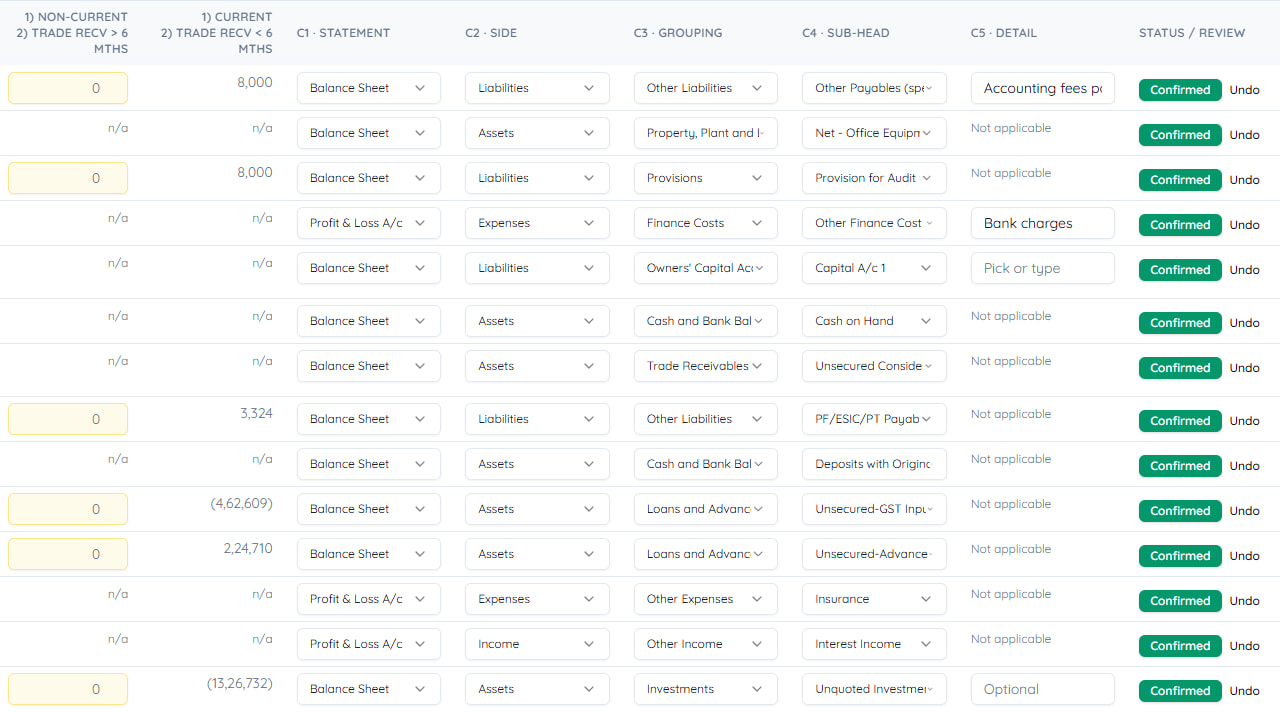
What happens if you leave it blank
Warning
With no non-current amount entered, the entire balance is treated as current — and notes 5, 7, 8, 15 and 16 will not appear, however much money sits in the grouping. This is the single thing about this module that most often surprises people.
A twenty-year term loan sitting entirely under current liabilities is not a rounding error. It is a materially wrong Balance Sheet, and it is what a blank column produces.
OptiVida reports it rather than hiding it
A note that would be empty because you have not answered yet is reported as missing data, not printed as nil.
That distinction is deliberate: an unanswered question is not an answer of nil. The Checks sheet lists exactly which ledgers are waiting on a split, so it is visible rather than something you have to remember to look for.
Tip
The Checks sheet is where outstanding splits are listed.
Trade receivables are different
They are not split this way. Receivables are aged — over six months and within six months — from bill-wise data, rather than bifurcated by a figure you enter.
If your Tally holds bill-wise details the ageing follows from them. If it does not, the note tells you so.
A practical order of work
Classify everything first
Get Needs a decision to empty.
Filter to the groupings that split
Borrowings, investments, loans and advances, provisions, other liabilities, other assets.
Enter the non-current amount on each
From the repayment schedule, not from memory.
Check the Checks sheet
It lists anything still waiting.
Last updated 21 Sept 2026
Still stuck? Ask us