

Reviewing the trial balance
The TB CY sheet, what each column tells you, and filtering down to what still needs a decision.
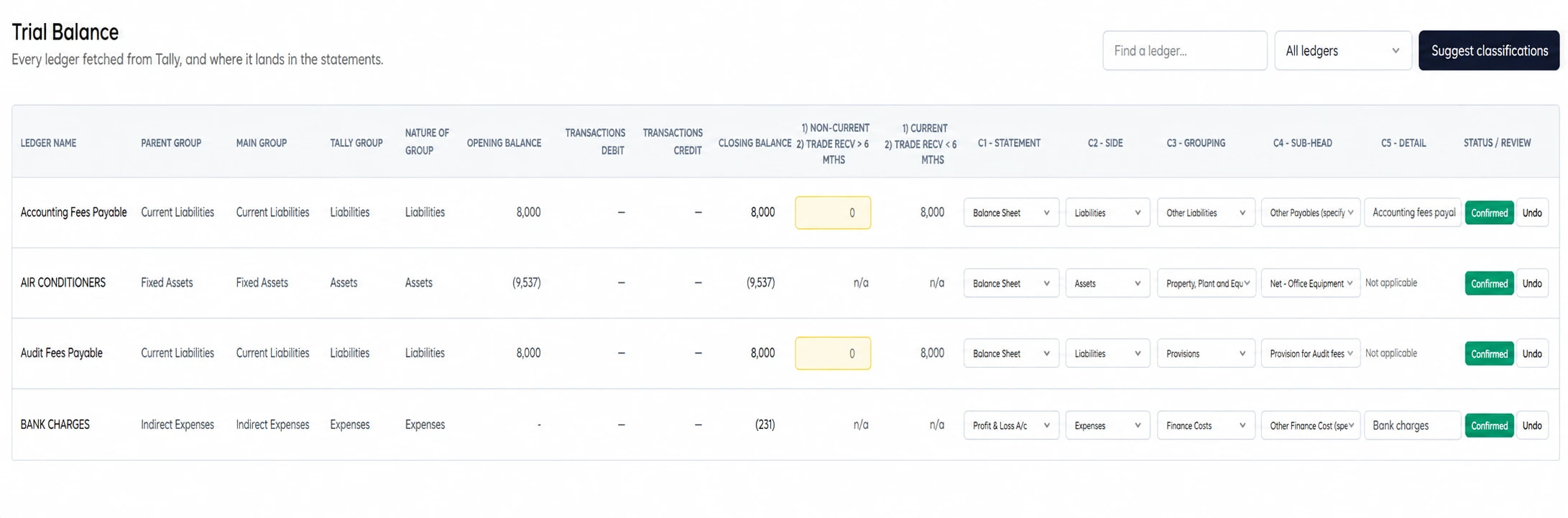
The TB CY sheet is where classification happens. One row per ledger, and a filter that narrows it to what still needs you.
The columns
- Ledger NameFrom Tally
As it is named in the books.
- Parent Group, Main Group, Nature of Group, Tally GroupFrom Tally
Where the ledger sits in Tally's tree. Stronger evidence of what it is than the name.
- Opening Balance, Transactions Debit, Transactions Credit, Closing BalanceFrom Tally
The figures as fetched. Closing balance is what gets classified.
- Bifurcate BalanceYours to set
The non-current portion, where the grouping splits across the face. Headed 1) Non-Current 2) Trade Recv > 6 Mths on the sheet, with the remainder shown beside it.
- C1 · StatementYours, usually pre-filled
Balance Sheet or Profit and Loss.
- C2 · SideYours, usually pre-filled
Which half of that statement.
- C3 · GroupingYours to set
Which note this ledger belongs to.
- C4 · Sub-headYours to set
Which line inside that note.
- C5 · DetailSometimes required
Named where the sub-head asks for it.
- Status / ReviewComputed
Where this ledger stands, and why it is in the queue if it is.
The five run in that order and each opens the next: C2 stays closed until C1 is set, C3 until C2 is. Classification fills them in where it can, and every one of them is a dropdown you can change.
The filter
- All ledgers
Everything, in trial balance order.
- Needs a decision
What is unclassified, was rejected, or is a proposal waiting on you. Start here.
- AI suggested
Classified automatically and awaiting your eye.
- Confirmed
Settled — by you, or carried from last year.
Working Needs a decision to empty, then AI suggested, is the whole task.
Suggest classifications
Runs automatic classification over the ledgers that have none. Use it after a fetch, or after posting entries that added ledgers.
It will not overwrite a decision you have made. It can replace what the software worked out for itself — an unreviewed suggestion, or a classification carried from last year — when the current rules make something different of the current balance.
Setting a classification
Pick C3 · Grouping, then C4 · Sub-head. The sub-head list narrows to what is legal for that grouping and for this report's Net Block or Gross Block choice, so an impossible pair is not offered.
When it asks you to name the nature
Some sub-heads are "other" buckets, and a note listing an unexplained "other" helps nobody. Those ask for C5 · Detail — Name the nature — and the row is not complete until you give one.
What the status on each row means
Six of them, and they are not interchangeable. Only the first two are a decision a person made.
- ConfirmedYou approved the suggestion as it stood
Settled by you.
- Changed by youYou overrode what was suggested
Settled by you, differently.
- AI suggestionAwaiting your eye
Carries the model's confidence and its one-line reasoning, with Accept and Reject beside it.
- Reused · previous yearCarried from last year's engagement
A decision you made last year, re-checked against this year's balance. It has not been looked at this year.
- Rule appliedSettled by Tally's own group
Not a judgement — Tally's reserved group left only one answer. An overdraft under Bank OD A/c is a borrowing.
- Pending reviewA proposal, not an answer
A rule proved which side of the sheet the balance belongs on but not which sub-head. A debtor carrying a credit balance is money held against a customer, so it is moved off the receivables line — but whether it is really an advance is yours to say. A tax ledger carrying a debit balance is input credit, so it is moved to Loans and Advances — which credit it is, is yours to say. A ledger under Deposits (Asset) is offered as a security deposit — confirm it is not a fixed deposit, and enter how much of it is long-term.
Last year's split is entered on TB PY
The comparatives column splits a balance between long-term and short-term on its own entry, not on this year's: what was long-term at last year's end is a fact about last year. The TB PY sheet's Non-Current cell takes it, and it is kept when you fetch again.
Editing a figure Tally gave you
The balances on this sheet are your client's books, and they stay that way. But an adjustment the client has not posted yet, or a balance you know to be wrong, sometimes has to reach the statements before Tally is corrected — so the opening and closing balances can be edited, behind a warning.
Warning
An edit changes this report only. Tally is never written to. Tally's own figure stays under the row, is listed on the Checks sheet with yours and the difference, and is carried into the workbook — so the change is a visible decision, and the checks that reconcile to Tally's own totals will say the two differ. Restore puts Tally's figure back.
Enter the figure the way the sheet shows it: credit-positive, a debit balance negative. A note saying why is optional and is printed wherever the edit is reported. Fetching again keeps your edit and records Tally's current figure beside it.
Only the green two are yours
Confirmed and Changed by you are decisions. The other four are the software's working, however settled they look — and only the two green ones are stored and reapplied next year. An unreviewed suggestion is never persisted, so a single model error cannot become a permanent one.
When your answer and the balance disagree
Your classification always stands — nothing overrules a Chartered Accountant. But where it contradicts the ledger's own balance, the row says so in amber beneath the status.
The usual case is a balance that has moved since you decided: a supplier you classified as a payable who is now in debit. Left alone, that debit sits on the payables line and subtracts from the real creditors, and the face of the balance sheet shows only the difference.
Nothing is moved for you. The row tells you, and the Needs a decision filter brings it back so it cannot be lost.
Finding a ledger
Find a ledger… searches by name. Quicker than scrolling when you know what you are looking for.
Last updated 12 Sept 2026
Still stuck? Ask us