

Turning on connectivity in Tally
The step people miss: opening port 9000 so Tally will answer at all.
Tally does not answer outside requests until you tell it to. This is the step most people miss, and the cause of most "Tally not reachable" messages.
Switch it on
In Tally Prime, with your company open:
Press F1, then choose Settings
From anywhere in Tally.
Open Connectivity
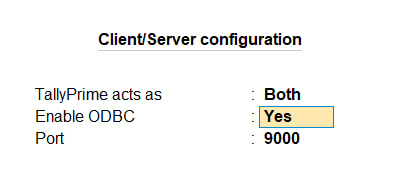
Set TallyPrime acts as to Both
Under Client/Server configuration. Both means Tally will answer requests as well as make them.
Set Enable ODBC to Yes
This is the setting that opens the port. Older material, and the Connector's own on-screen note, call it Enable HTTP XML — TallyPrime labels it ODBC, and it is the same row.
Check the port reads 9000
The default, and what the Connector expects.
Accept the screen
Tally applies it immediately. No restart needed.
On an older build
Some Tally ERP 9 builds put this under F12Advanced Configuration rather than under F1. The three settings are the same.
Confirm it worked
Open the Connector from the notification area. Its Tally card should now name your open company. If it does not, use Test the connection on the Tally settings tab — that pings Tally there and then, rather than waiting for the background check.
Three things that stop it
- Tally is not open
Or is open with no company loaded. Both look the same from outside.
- Something else holds port 9000
Another Tally instance is the usual culprit. Only one can hold the port.
- Tally is on a different machine
The Connector reads Tally locally. It cannot reach a Tally across the network or on a server.
Warning
Tally must be open with the right company loaded at the moment you fetch, not merely at the moment you set this up. A fetch against a closed Tally, or one showing a different company, will not quietly use stale figures — it will tell you.
Tip
Next: Pairing your device. If Tally still will not answer, see OptiVida cannot reach Tally.
Last updated 31 Aug 2026
Still stuck? Ask us