

Unmapped ledgers
What unmapped means, how to assign one, and why nothing is ever silently dropped.
A ledger OptiVida could not place in a CMA line with confidence. It is listed for you rather than guessed at.
What unmapped means
Every ledger has to land on some line of the operating statement or balance sheet. Where OptiVida is not confident which, it declines.
Why declining is the right behaviour
A declined ledger is reviewed by a Chartered Accountant, which is far better than a confident wrong answer. A plausible-looking guess is the failure that would actually reach a signed report.
Nothing is silently dropped
An unmapped ledger has a balance that is not yet anywhere in your figures. That is exactly why the panel exists: the alternative — quietly leaving it out — would produce a report that looks complete and is not.
Warning
Assign every unmapped ledger before you generate. A balance left unassigned does not appear in your totals, and nothing on the finished report will say so.
Assigning one
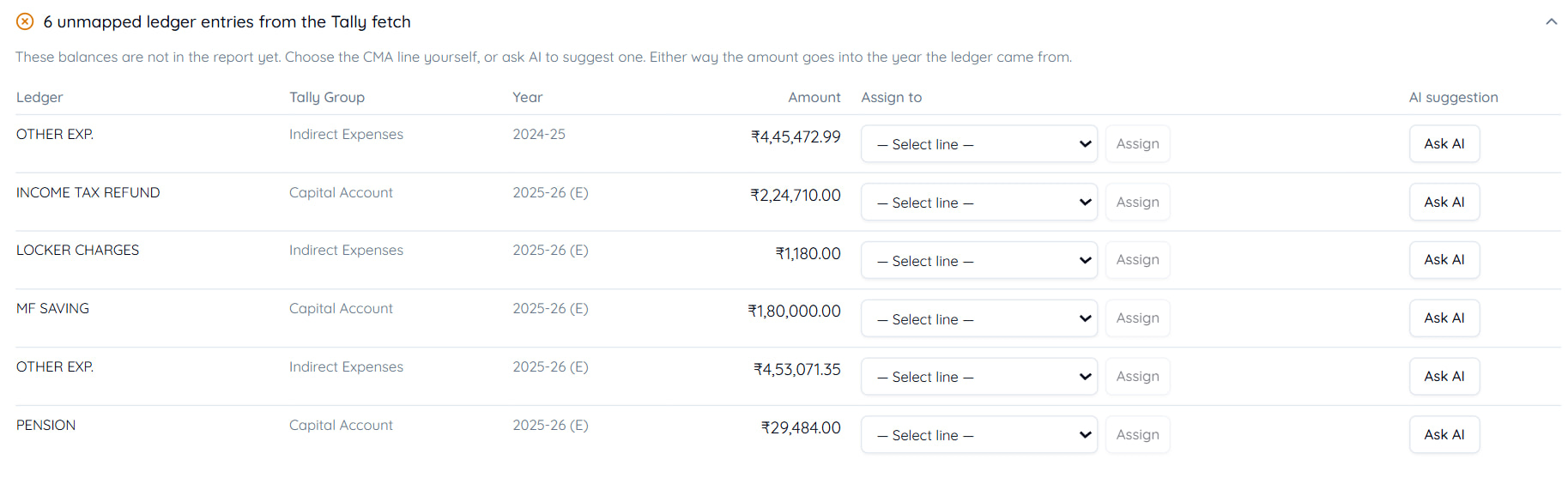
Open the unmapped panel
It lists what needs a decision, with each ledger's name and balance.
Read the ledger's context
Its name and parent group in Tally are usually enough to say what it is.
Choose a line from the dropdown, then Assign
The list is the CMA lines legal for that kind of ledger.
Or press Ask AI
It suggests a line for that ledger. The suggestion is still yours to accept.
Move to the next
The panel shrinks as you work.
Either way the amount goes into the year the ledger came from, which the panel shows against each row.
Correcting a mapping you disagree with
Automatic mappings are suggestions. If OptiVida placed a ledger somewhere you would not have, change it — right-click the cell to see which ledgers feed it, then reassign.
Your correction stands. Nothing overwrites it on a later fetch.
Why a ledger comes up unmapped
- An unusual name
Nothing in the name or group says what it is.
- A genuinely ambiguous account
A "Sundry" or "Miscellaneous" ledger could be several things. Only you know which.
- A new ledger
Opened during the year, with no history to go on.
- Suggestions were unavailable
A whole batch can arrive unclassified if automatic classification could not run. Assign them by hand.
Tip
After assigning
Totals recompute immediately, and the balance sheet and ratios follow. If a figure was out because a ledger was sitting in the panel, it corrects itself the moment you assign it.
Last updated 31 Aug 2026
Still stuck? Ask us