

Where a figure came from
The cell source badges, inspecting the ledgers behind a number, and asking about a cell.
Every figure in the grid says where it came from. This is the page worth reading before you sign anything.
The cell source legend
- Tally
Read directly from the books.
- Rule
Placed by a mapping rule — a deterministic instruction, not a judgement.
- AI
Classified automatically. A suggestion. Worth your eye.
- ITR
From an uploaded income tax return.
- User
You typed it.
- Derived
Computed from other cells. A subtotal, a ratio.
A cell with no badge is blank and waiting for you.
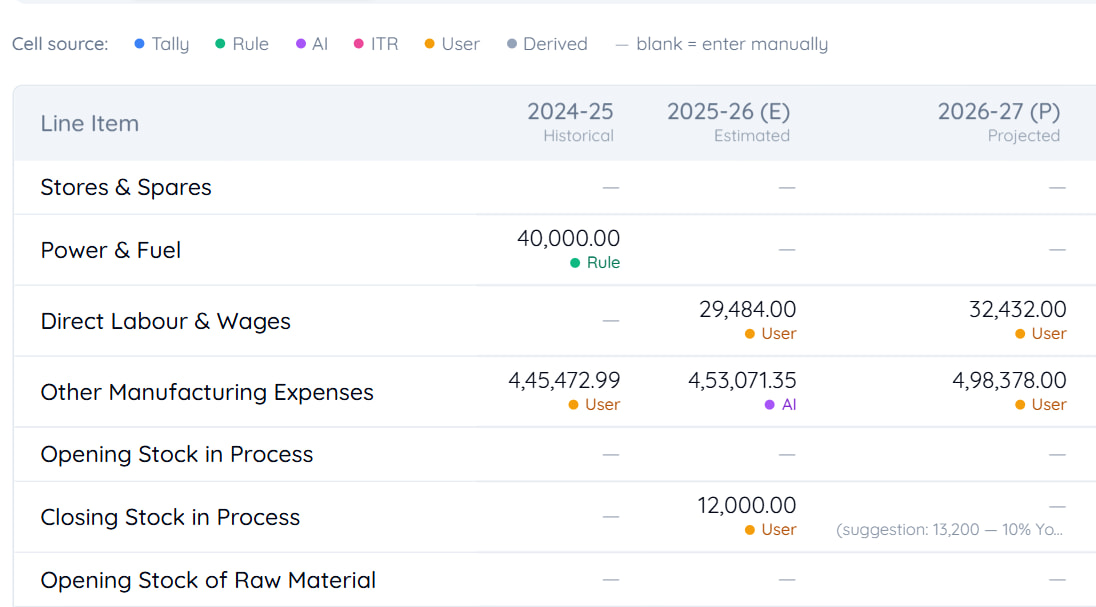
Reading the grid at a glance
The badges answer the question a reviewer actually asks: how much of this came from the books, and how much is judgement?
Note
A report that is mostly Tally and Derived is traceable to the books. One that is mostly User is your own work — perfectly legitimate, but it is worth knowing which you are looking at before signing.
Pay closest attention to AI. Those are suggestions that have not yet been through you.
Inspecting a cell
Right-click a cell — or long-press on a touch screen — to see its details: which ledgers contribute to it, what each contributes, and how the total was arrived at.
For a derived cell it shows the computation. If a subtotal looks wrong, this is where you find out which component is.
Ask AI about a cell
You can ask about a particular cell — what feeds it, why a ledger was placed there. It explains; it does not change anything.
Warning
An explanation is not a justification. Reasoning shown against a figure is there to help you check it, and it is never the basis on which a number should be accepted. The figure has to stand on the ledgers behind it.
There is a daily limit on how many questions you can ask.
Correcting a figure
Type over it and the cell becomes User. Everything derived from it recomputes.
Your value stands. A later fetch will not overwrite it.
Before you generate
Clear the unmapped panel
An unassigned balance is not in your totals.
Review every AI cell
Suggestions that have not been through you.
Check the blanks
Especially in Form I and the annexures, which Tally cannot fill.
Read the validation panel
Errors block; warnings are for your eye.
Last updated 31 Aug 2026
Still stuck? Ask us